

Inkscape - Create and edit graphic vectors with total simplicity.
Inkscape is a free graphic editor for Windows that can be used for personal and professional purposes. The program has a complete set of design tools that allow you to work with vector graphics files, known as SVG. It also allows you to work with rasterized images (bitmaps).
Inkscape works similarly to Adobe Illustrator, although the Adobe program requires a subscription, while Inkscape is completely free. For those who work more with rasterized graphics than vector graphics, other alternatives to Inkscape are GIMP, Krita, or Sketchbook.
The best option for creating vectorized images
If you want to design logos or have the need to use specific images in different web projects, using vectorized images is more useful than using rasterized images, due to the limitations of this format when enlarging them without losing resolution.
Inkscape is a vector graphics software used daily by many designers to create a wide variety of graphics, such as icons, illustrations, logos, maps, diagrams, and web designs. It is a free and open-source software that integrates Scalable Vector Graphic as its native format.
Inkscape provides sophisticated vector drawing tools with capabilities comparable to professional standards. It allows importing and exporting various file formats, including AI, SVG, EPS, PS, PDF, and PNG. It has user-friendly functionalities, a simple interface, multi-language support, and is extensible, as users can customize Inkscape's functions with its numerous extensions.
Constantly evolving
Inkscape has a growing community of users, and there are multiple learning materials that will help you carry out your creations. Support and assistance are provided by the community itself.
If you are new to creating vector graphics, it may seem complex at first, but soon you will be able to experience the power and flexibility that Inkscape provides. Generally, users prefer vector design for creating logos, icons, and illustrations that can be scaled without losing resolution.
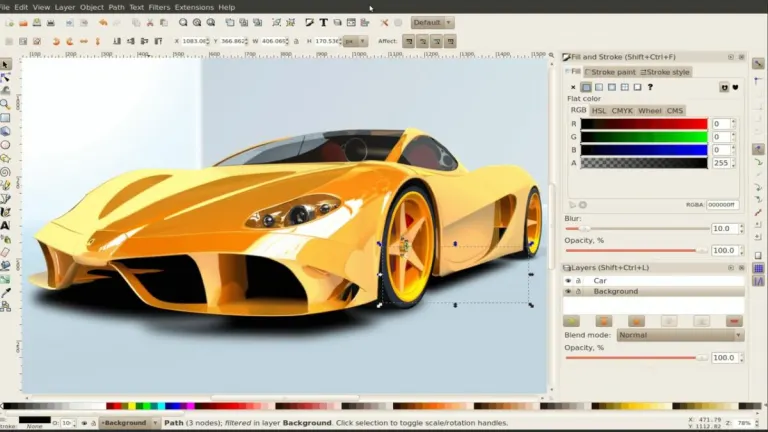
Inkscape incorporates the typical tools of a drawing program, in addition to providing the ability to work with layers. The latest versions of the program feature an improved user interface and greater compatibility with 4K/HiDPI screens.
Professional results with a free tool
Inkscape is an excellent design program that includes all kinds of professional features for free, such as strokes, shapes, text, clones, markers, transformations, alpha channel blending, patterns, gradients, and grouping. It also supports Creative Commons metadata, layers, node editing, graphic file vectorization, complex path operations, and direct XML editing, among other functions.
Furthermore, Inkscape allows you to create a vector graphic from any digitized real-world artwork, such as a sketch or simple doodles on a napkin. Once vectorized, you can create professional-quality designs thanks to the extensive functionalities offered by Inkscape.
Inkscape is available for Windows Vista and higher versions, including Windows 11. Additionally, the program is fully translated into Spanish, so you can work on your designs without getting lost along the way.
.png)


.png)




















User reviews about Inkscape
by Fiona Mizu
It is easy to use for us.
by Lorralee Opperman
Easy to learn, easy to use. Tons of features, love using in my paper crafting.
by Rehana Guroong
Its a really good app for those how enjoy working with software programe
by H.L Lowe
very good lets you do anything on the computer lets me do a lots of things
by Leila Almasi
I actually use Inkscape more often than Adobe Illustrator. I think most of us know how complicated Adobe Illustrator is and it really requires a day or more to learn about it and create a satisfying image that's why I often use Inkscape because for me it has an easier to learn and understand tools. More
by Amit Kummar
Even though Inkscape is a free software tool, it doesn't change the fact that it produces high quality icons and images. To be honest, I used this software when I created the icon for our small business and surprisingly, it got a lot of praise from our customers. They said that it was neatly done and they even asked if we hired a graphic artist haha More